
How to be a good Whatnot moderator
A Whatnot mod runs the chat so the seller can sell: welcomes, quick answers, calm rule-keeping, and thanking every raid, tip and giveaway winner. Here's how.
A Whatnot moderator runs the chat so the seller can focus on selling: welcoming people, answering quick questions, keeping order, and making sure every raid, tip and giveaway winner gets thanked.
Being a Whatnot moderator looks simple from the outside — you watch the chat. But a good mod is the difference between a show that feels warm and organized and one that feels chaotic. You’re the seller’s second set of hands: you run the room so they can run the sale. Here’s how to do it well.
What a good moderator actually does
Your job isn’t just to remove trolls. On a busy show you’re doing four things at once:
- Welcoming new people and returning buyers so the room feels friendly.
- Answering quick, repeated questions (sizes, shipping, how bidding works) so the seller doesn’t have to stop.
- Keeping order — calming or removing anyone breaking the rules.
- Catching the thank-yous — every raid, tip, giveaway winner, and sponsor who deserves a shout.
Do those four well and the seller barely has to look at the chat. That’s the whole point.
How you become a mod, and what’s in it for you
Mod is short for moderator, and on Whatnot it’s not a job you apply for. Each seller picks their own mods, show by show: they add you while scheduling a show, or tap your username in chat during one and choose Allow to Moderate. The way in is to be a regular in a seller’s shows, help in chat before anyone asks, and offer. The exact steps for both sides are in Whatnot mod commands and how to become a mod.
Do mods get paid? Whatnot’s help center doesn’t mention any pay for moderators. Anything you get, whether that’s pay, store credit, first pick of new stock or a shout-out, is between you and the seller. Plenty of mods do it because they love the community. Whatever you agree, agree it before the show, not after.
Agree the ground rules with the seller first
Before the show starts, get on the same page with the seller:
- What’s the vibe — family-friendly, playful, strict?
- What crosses the line (spam, price arguing, promoting other sellers, rudeness)?
- Do they want you to warn first, or remove straight away?
- What should you announce, and how often (giveaways, follow reminders, shipping notes)?
The streamer shapes the show; you support it. Sorting this out up front means you’re never guessing mid-stream.
Know your commands
Whatnot gives mods four short chat commands, /announce, /hide, /slow and /raid, plus the power to remove someone from the show. Learn them before your first show; each one, with examples, is in Whatnot mod commands explained. The tools around them, like muted words and the viewer list, are in the Whatnot moderator toolkit.
Keep the chat welcoming
The best mods make the room feel like a place people want to stay. Welcome newcomers by name. Cheer on first-time buyers. Nudge people to follow and bookmark — kindly, not spammy. You’ll be posting the same handful of lines over and over, which is exactly the kind of thing worth having ready to go rather than re-typing every time.
Handle rule-breakers calmly
When someone gets rude or disruptive, don’t take the bait and don’t turn it into a public fight:
- Give one clear, friendly reminder of the rule.
- If they keep going, remove them quietly and move on.
- Never let a troll pull the whole chat into an argument — that’s the real damage.
Lead by example, not by force. A calm mod keeps the whole room calm.
Never let a thank-you slip
This is the part that separates a good mod from a great one. On a busy show, raids, tips, giveaway winners, and sponsors pile up faster than you can keep track of — and a supporter who goes unthanked notices. Keep a running list of who’s owed a shout, and thank each one by name.
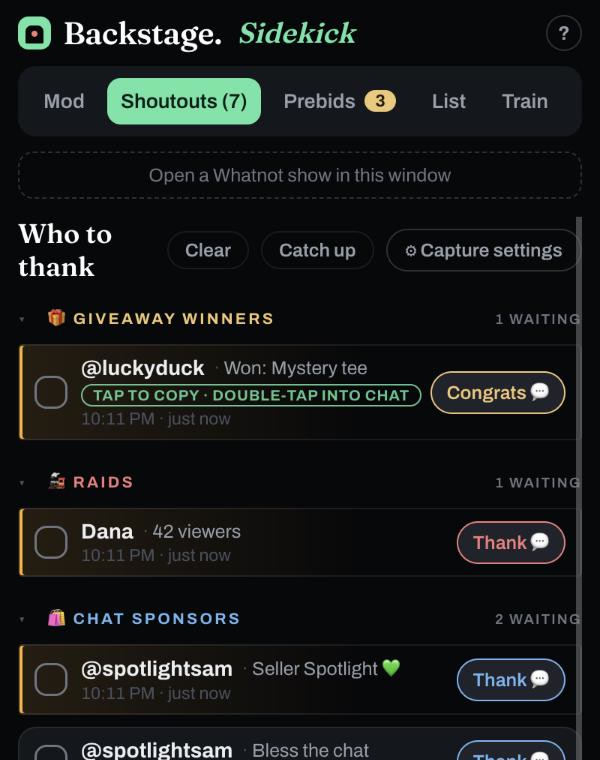
This is exactly why we built Backstage Sidekick, a free helper that rides beside your Whatnot show, as a Chrome side panel or an iPhone and iPad app. It gives you a deck of chat phrases (welcomes, follow reminders, giveaway hype) with a separate phrase set for each seller you mod for, size and brand chips with your favorites first, and a who-to-thank list that gathers raids, tips, sponsors and giveaway winners in the order they arrived, so you can thank each person by name and check them off. A tap sends the phrase straight to chat, or switch to Copy and paste it yourself. Turn on /announce or /hide to post it as a highlighted message or one only the seller and mods see. Every phrase is outlined in the mode’s color so you always know what a tap will do: yellow goes to chat, red goes to chat hidden, green copies. Build mode collects several taps into one message. It’s free, with no account needed.
Keep the energy up
Good mods also help the show sell. Point people to the listings already getting attention. When a giveaway is running, remind people to tap Enter Giveaway and stay in the show until the winner is drawn. Hype the next drop. You’re not just keeping order — you’re keeping the momentum going, which is what keeps buyers watching.
The bottom line
A great Whatnot moderator makes the seller’s job easier and the room friendlier: clear rules up front, a warm welcome for everyone, a calm hand with troublemakers, and a thank-you for every single supporter. Master those and sellers will want you in their mod seat.
Next steps
- Make modding easier: get Backstage Sidekick free.
- Running your own show too? See Backstage Live in Chrome and Backstage for iPad.