Sidekick shoutouts: nobody goes unthanked
Every raid, tip, boost, giveaway win, sponsor buy and first-time buyer, in order.
Sidekick
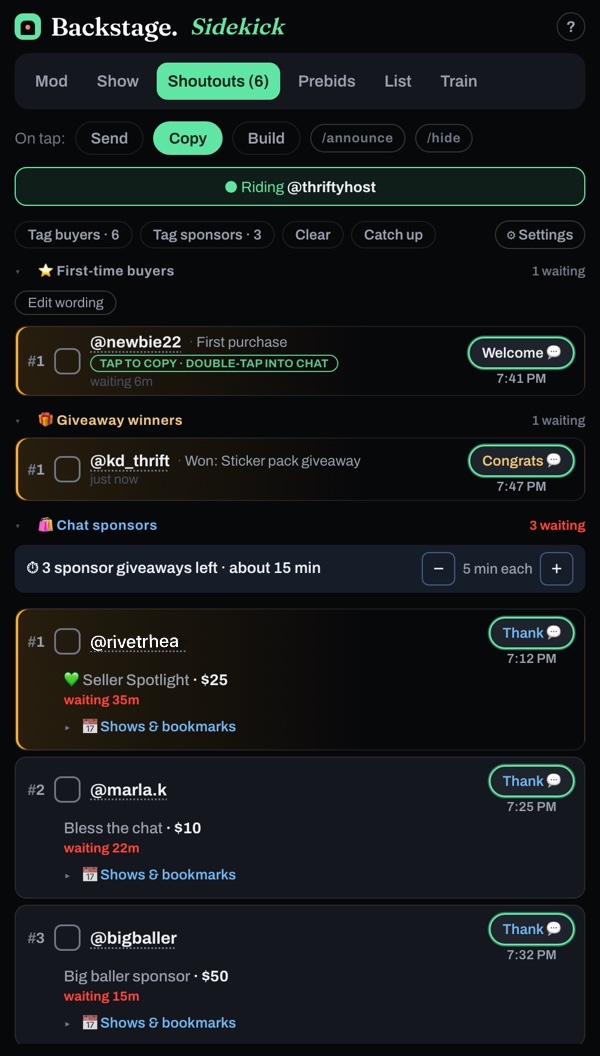
- Every raid, tip, boost, giveaway win, sponsor purchase and first-time buyer lands on the Shoutouts tab, oldest first.
- Tap Thank, Congrats or Welcome and the message goes out with their name in it.
- Tick the box when they're handled. Ticked rows fold away.
- Opened it late? Tap Catch up. It reads the show's sales back to the first one, so a big show can take up to a minute.
- Add the host's own sponsor item names under Sponsor items.
First-time buyers
When someone buys from this seller for the first time, they get a ⭐ row with a Welcome button. Change the welcome message with Edit wording.
Sponsors
- Each sponsor's card shows what they paid.
- Under Chat sponsors, Sidekick shows how many sponsor giveaways are still owed and about how long they'll take, like 3 sponsor giveaways left · about 15 min. Each sponsor buy is one giveaway.
- It counts down as sponsor giveaways are won or you close a sponsor's card. Giveaways running shorter or longer? Change the minutes with − and +.
Tag buyers and Tag sponsors
Tag buyers puts everyone who bought this show into one chat line, for a buyer's giveaway. Tag sponsors does the same for the show's sponsors and ends with "Thank you sponsors!!".
Whatnot caps a message at 150 characters, so each tap tags the next people not tagged yet. The button counts how many are done. Start over tags everyone again from the top.
After the show
Open the End-show recap from the Shoutouts settings and tap Copy this to send it to the seller. It includes what the sponsorships came to. Starting a new show? Tap Clear.